
Busing is only available to students registered and living within a school’s catchment area. Throughout the school year, we safely transport more than 6,600 SSRCE students to and from school.
Students in Pre-primary, Primary, Grade One, or Grade Two must have someone to meet them at their after-school bus stop. Please read more here in our discharge guidelines.
A reminder that all children under 40lbs and younger than 4.5 years old need to use a seat belt while on the school bus. Parents/guardians/or an older sibling must buckle them in the morning and unbuckle them after school. For more information on proper seat belt procedures, please review this video.
Using Bus Planner
Getting your child’s transportation details is easier than ever! We have now switched to Auto-Authentication in the BusPlanner Parent Portal, which will automatically link your account to your student’s records.
To ensure you can view your child’s bus route, stop location, and pick-up/drop-off times, please follow the steps below.
- Verify Your PowerSchool Settings
Before logging into the portal, your information in PowerSchool must be accurate. The system will only “find” your student if:
- Email Match: The email address you use for BusPlanner must match the email address listed in your PowerSchool parent account.
Note: If you need to update your email please contact your school’s main office for assistance.
- Accessing the BusPlanner Portal
Once your PowerSchool information is verified:
- Navigate to the Portal: Visit the BusPlanner website.
- Log In: Click the Parent Portal login button (or create an account if you don’t already have one).
- Authentication: Sign in, or create an account with your registered email (the same email used in PowerSchool). There is no need to manually add students using IDs; the system will automatically pull their data based on your email.
- Viewing Busing Details
Once logged in, your student’s information will be visible on your home dashboard, including:
- Route Numbers (Morning and Afternoon)
- Stop Locations
- Pick-up/Drop-off Times (Estimated)
Troubleshooting Tips
- Student Not Showing Up? Double-check for typos in your PowerSchool email and ensure you are using that specific address to log in.
- Information Outdated? Please allow 24–48 hours for changes made in PowerSchool to sync with the BusPlanner system.
- If you are still not seeing your child’s bus information please contact your school’s main office to ensure you have portal access in your PowerSchool account.
On the main page of BusPlanner Web, parents can also:
- Click on School Information to access information about schools, including address and phone numbers
- Click on Which School do I Attend? to determine which schools you are eligible to attend based on your civic address
- Click on Can I Ride a Bus? to determine whether you are eligible for bussing based on your civic address
- Click on Parent Portal to log in to your account to gain confidential information about your student
Other Transportation Information:
Back Road Closure Plans
Bus Stop Change/Create Request Form
MOTOR CARRIER ACT Nova Scotia 04.3 MCA Regulations for School Buses 0206
Catchment Area Calculator
Click the link below to determine what school your child(ren) would attend based on your address. You can enter your home address and be shown what schools are in your catchment area (colour-coded). If you are new to the area or looking at a home on the South Shore, this map is a great resource for your planning!
School Catchment Area Calculator
Student Responsibilities
- Remain well back from the road until the bus has stopped and its loading doors are opened.
- Board the bus in a single file, without pushing or shoving. Older students should allow younger students to board first.
- Sit in their seat (assigned, if application) immediately after boarding the bus and remain seated whenever the bus is moving.
- Treat each other with respect. Teasing, name-calling and foul language are not acceptable and will not be tolerated.
- Ask the driver’s permission before opening a window. No part of the body may extend outside the window.
- Keep noise levels low so the driver can concentrate on driving the bus.
- Use the utmost care when carrying objects such as music instruments and skates onto the bus, so as not to injure other students. Only items allowed on school property are permitted on school buses. Carry on items must be stores in a canvass bag and be small enough to fit on the student’s lap or on the floor, between the student’s legs.
- Keep the aisles clear of all obstructions – books, lunch boxes, legs and feet, gym bags, backpacks, etc.
Unacceptable behaviour is anything which could endanger safety. Drivers will report any disciplinary problems on their buses to the school principal, who will determine what disciplinary action will be taken and will advise the student and family accordingly. The principal can temporarily suspend students from riding the bus and, for continued misbehaviour, may permanently withdraw bus privileges.
Do you have a bus stop in front of your home?
Please ensure your civic number is clearly visible from the road. A well-marked civic number makes a big difference, especially in low-light or poor weather conditions. If your address is hard to see, consider using reflective numbers near the road
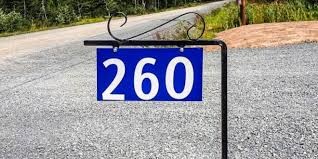
Why is this important?
- Helps bus drivers quickly identify stops
- Ensures a safe & efficient pickup/drop-off
- Prevents delays for all students
For more information please contact:
For questions regarding discipline of students, or concerns or persistent difficulties with a bus driver.
Denise Crouse, Transportation Coordinator
Phone: 902-541-8248
Email: dcrouse@ssrce.ca
Chris Dares, Transportation Manager
Phone: 902-541-3056
Email: cdares@ssrce.ca